
MoveNet MultiPose
Real-Time 2D Multi-Person Pose & Proxemics
RUN
Background
Most of this toolkit's body-pose tools are built for a single subject. MoveNet MultiPose is different: it estimates a full 17-point skeleton for every person visible at once (up to six), which makes it a practical starting point for group-level questions that single-person pose tools can't answer — how close together are people standing, how does that spacing change over a session, and who is near whom.
MoveNet is a lightweight pose-estimation architecture from Google's TensorFlow.js team. This tool uses the MultiPose Lightning variant, which trades a little per-person accuracy for the ability to detect several people in a single forward pass, with optional bounding-box tracking so a person keeps the same ID across frames.
Process
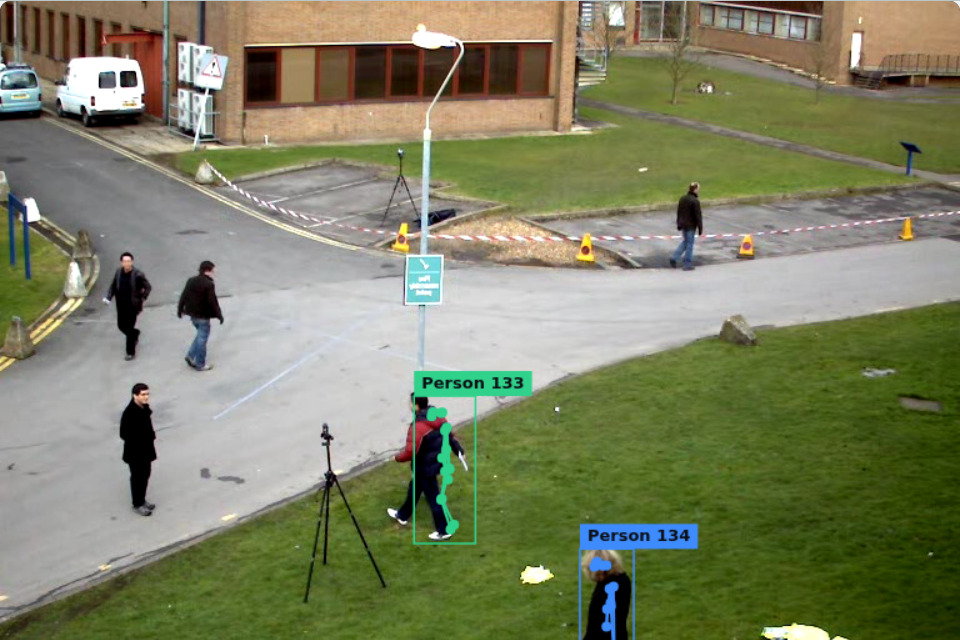
Each frame from the webcam or an uploaded video is passed to the MultiPose Lightning model, which returns up to six poses, each with 17 keypoints (nose, eyes, ears, shoulders, elbows, wrists, hips, knees, ankles), a per-keypoint confidence score, and a bounding box. Poses below the confidence threshold set in the settings panel are discarded.
From the remaining poses, the tool computes a simple proxemics signal: the hip-midpoint ("ground position") of each person, and the pixel distance between every pair of people in the frame. It reports the average and closest pairwise distance live, and records both per-person keypoints and these group metrics on every frame while recording is active.
Results
The run page follows the toolkit's standard workflow: run live detection from the webcam or an uploaded video, record a session, tag moments, view a session overview, and download both the captured video and a prediction CSV. Each CSV row is one detected person in one frame, with that person's 17 keypoints (x, y, confidence) plus the frame's people-count and pairwise distance metrics.
A note on the distances: they're reported in pixels relative to the video frame, not calibrated to real-world units like meters. They're useful for comparing relative spacing within one session (did two people move closer together over time?) but not for comparing absolute distances across different camera setups or zoom levels.
References
- MoveNet blog post: https://blog.tensorflow.org/2021/05/next-generation-pose-detection-with-movenet-and-tensorflowjs.html
- Pose Detection API source: https://github.com/tensorflow/tfjs-models/tree/master/pose-detection